Introduction
GH Planner is a shared kanban board that connects to your GitHub repository. You plan work as tasks, link each task to a pull request, and the board keeps itself up to date as that pull request is reviewed, approved, closed or merged. Your team can see where everything stands without chasing status updates.
GH Planner runs in the browser at ghplanner.com. It works on desktop, tablet and phone. It’s made by McPeak Bacon Limited.
Who it’s for
Section titled “Who it’s for”- Developers who want their task board to follow their pull requests instead of having to update it by hand.
- Reviewers and leads who want to see CI status, changed files and reviews, and act on them, from one place.
- Project managers and clients who need an honest picture of progress without a GitHub account or a status meeting.
Key ideas
Section titled “Key ideas”Boards
Section titled “Boards”A board is a shared workspace for one stream of work, usually one product or repository. Each board has its own columns, tasks, labels, members and settings. You can belong to as many boards as you like and switch between them from the Boards menu.
See Boards.
Columns
Section titled “Columns”A board is made of columns, such as Backlog, In Progress and Merged. Every column has a column type:
- A normal column is a plain list. Tasks only move in or out when someone drags them.
- A pull request column is where work waits for review. A task needs a linked PR before it can go in.
- PR status columns (Approved, Address Issues, Closed, Merged) receive tasks automatically when the linked pull request changes state on GitHub.
New boards come with seven columns already set up for a typical Git workflow. See Columns.
A task is a unit of work: a title, a description, assignees, labels, dates, a checklist and, optionally, a linked pull request. Click a task to see its full details. When a PR is linked, the task page also shows the PR’s checks, files and reviews.
See Tasks.
Pull request sync
Section titled “Pull request sync”Once a task is linked to a PR, GH Planner checks that PR’s state on GitHub and moves the task for you:
| When the pull request… | The task moves to… |
|---|---|
| is opened (or reopened) | the Pull Request column |
| has changes requested | the Address Issues column |
| is approved | the Approved column |
| is closed without merging | the Closed column |
| is merged | the Merged column |
See How tasks move automatically.
Members and visibility
Section titled “Members and visibility”Each board has members. Members can be Owners, who can change board settings and manage people, or Members, who work on tasks. A board’s visibility decides who else can look at it: anyone with the link, nobody but members, or members plus people you share single tasks with.
See Members and invites and Board visibility.
How it fits together
Section titled “How it fits together”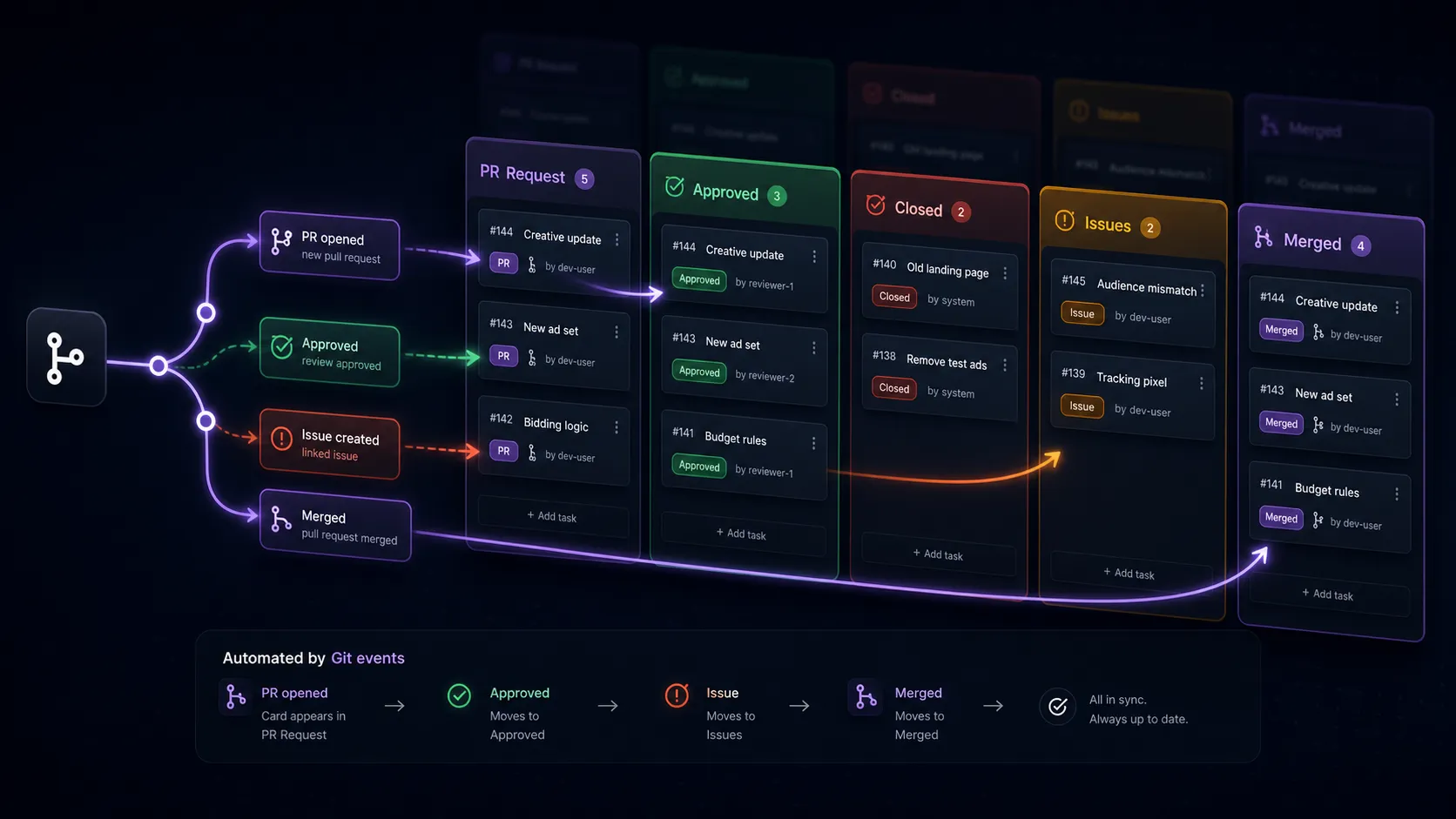
- You create a task in Backlog and drag it to In Progress when you start.
- You open a pull request, either on GitHub or from the task itself, and link it to the task.
- The task goes into the Pull Request column, where reviewers can see it.
- A reviewer approves or requests changes, on GitHub or from the task page in GH Planner. The task follows.
- When the PR is merged, the task lands in Merged and the work is done.
Ready to try it? Head to the Quick start.