How tasks move automatically
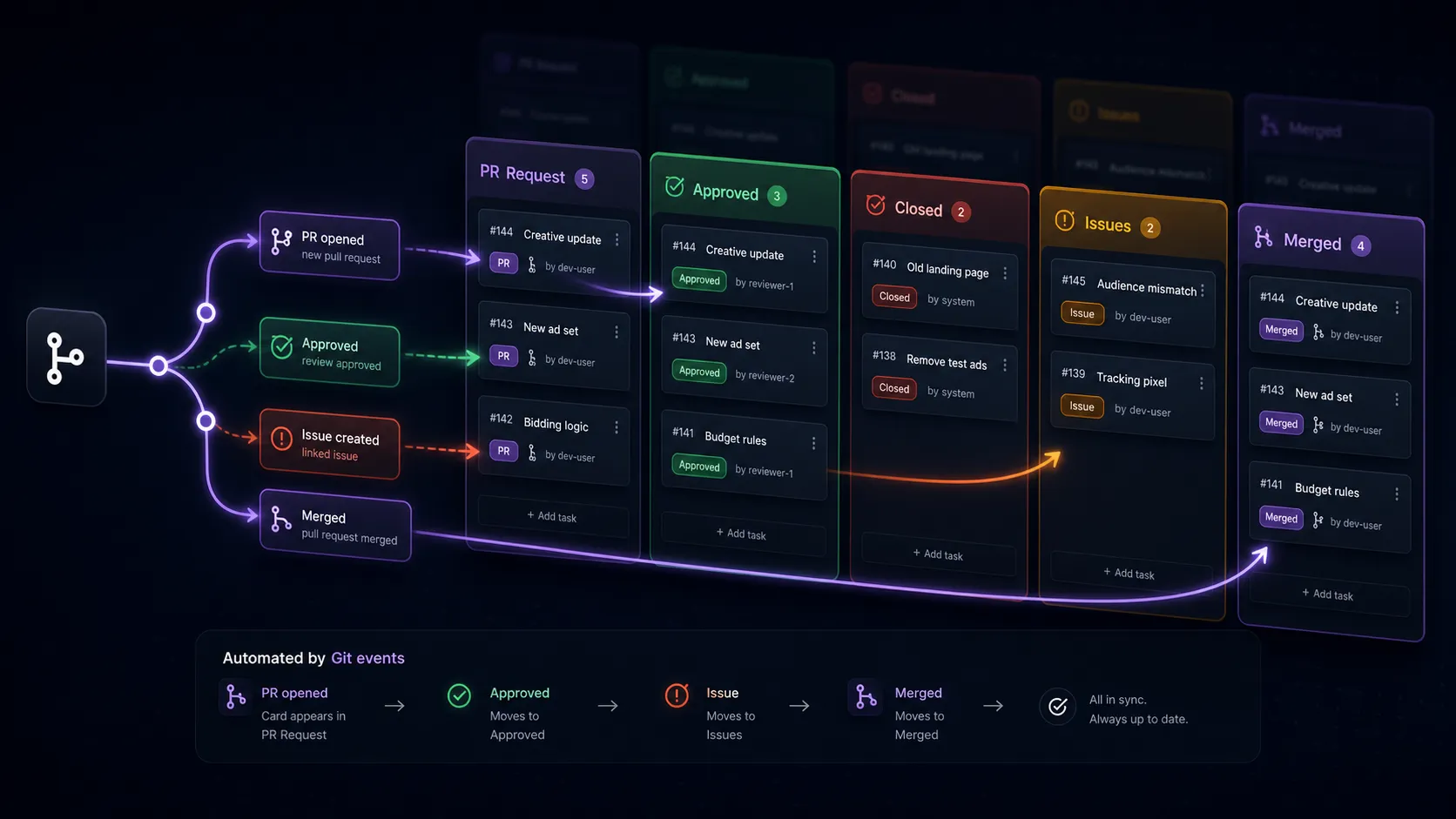
When a task is linked to a pull request, GH Planner keeps an eye on that PR and moves the task to the column that matches its state. Nobody has to drag cards around after a review.
The rules
Section titled “The rules”GH Planner looks at each linked PR and applies the first rule that matches:
| Order | When the pull request… | The task moves to… | Status becomes |
|---|---|---|---|
| 1 | has been merged | the PR Merged column | Merged |
| 2 | has been closed without merging | the PR Closed column | (follows the column) |
| 3 | is open again after being closed, and the task isn’t in a PR column | the Pull Request column | Pending |
| 4 | has changes requested | the Address Issues column | Changes Requested |
| 5 | has been approved and is still open | the PR Approved column | Approved |
Some things to know:
- Merged beats everything. A merged PR always sends the task to the merged column, even if it also had changes requested.
- Columns are found by type, not name. You can rename Merged to Shipped and it still works, as long as its column type is PR Merged Column. See Column types.
- No matching column, no move. If the board has no column of the right type, the task stays where it is but its status still updates.
- Tasks without a linked PR are never moved automatically.
When it happens
Section titled “When it happens”GH Planner checks linked pull requests every time a board is opened, before the board is shown, so what you see is always current. Changes you make from GH Planner itself, such as approving or merging from the task page, take effect straight away.
When a task moves, everyone looking at the board sees it move without needing to refresh.
Auto-create tasks from PRs
Section titled “Auto-create tasks from PRs”Turn this on to have GH Planner create a task for every new pull request, so nothing gets missed.
- Set the board’s repository in Board Settings → GitHub Repository.
- Turn on Auto-Create Tasks From PRs (Create a task in the PR column when a new PR appears).
- Save.
While the board is open, GH Planner checks the repository for open pull requests every couple of minutes. For each PR that doesn’t have a task yet, it creates one that:
- is placed in the board’s Pull Request column (or the first column if there isn’t one)
- is linked to the PR, with the PR number and URL filled in
- copies the PR description into the task description
- is assigned to the PR author, if they’re a board member with GitHub connected
Up to 25 tasks are created per check, so a repository with a large backlog of open PRs is filled in over a few checks.
Example workflow
Section titled “Example workflow”- Sam opens PR #42 on GitHub. With auto-create on, a task appears in PR Request, assigned to Sam.
- Alex reviews it and requests changes. The task moves to Address Issues with status Changes Requested.
- Sam pushes fixes and Alex approves. The task moves to Approved.
- Alex merges from the task page. The task moves to Merged.
Nobody touched the board, and anyone looking at it could see exactly where #42 was at every step.